
Product
Everything a project needs, in one window.
Screens
Already in the app.
- Threads
- Codex, Claude, Cursor, Devin, OpenCode and other ACP agents, side by side.
- Agent teams
- A lead plans, builders work in parallel, a reviewer checks.
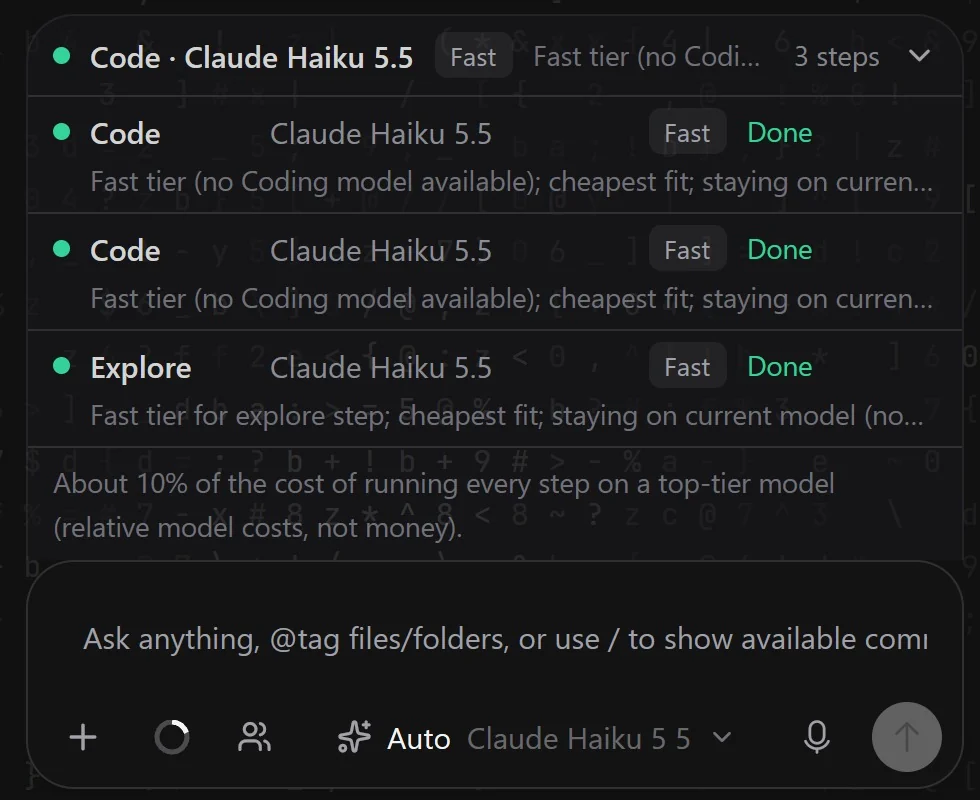
- Auto routing
- Each step goes to the cheapest model that can do it.
- Subagents
- See every subagent an agent starts, and open its thread.
- Approvals
- Approve commands and answer agent questions, here or on your phone.
- Memory
- Agents remember your preferences and project conventions.
- Chat references
- Type @ to give an agent an earlier chat as background.
- ZORDS
- Named bots for one job. Chat with them or call them.
- Voice
- Dictate in the message box, or talk to a ZORD hands-free.
- Dev Studio
- Files, editor, integrated terminal and a live list of local ports.
- Code intelligence
- Language servers for diagnostics, completion and hover.
- Git and pull requests
- Changes, commits, stashes and pull requests. Hand findings or conflicts to an agent.
- Kanban
- A task board that stays in step with your chats.
- Automations
- Run an agent on a schedule.
- Database Studio
- PostgreSQL, MySQL, SQLite, Snowflake and MongoDB.
- Dashboards
- Charts and tables built on your own queries.
- Side browser
- Open links and pages in a dock beside the chat.
- Pictures
- Mark up, zoom and copy images in chats.
- Customize
- Skills, connectors, MCP servers and plugins in one place.
- Add-ons
- Turn pages on or off, or describe a new add-on and an agent builds it.
- Your own endpoints
- Add any OpenAI- or Claude-compatible API.
- Quota at a glance
- See how much of each provider's quota is left, from any page.
- Phone
- Follow and steer every thread from Android.
- Remote Desktop
- See and control your PC's screen from the phone.
- More databases Soon
- More database types are coming soon.
- More agent CLIs Soon
- More agent CLI providers are coming soon.
Spend less on models.
Your work stays on your machine.
On device, always
- Projects and settings
- Threads and memory
- App data
Only when you connect it
- Databases you connect
- Model providers you pick
- Git remotes you push to